---
title: How to set up the EQUIMETRE app ?
description: Setting up the EQUIMETRE application on a smartphone
---
[Skip to content](https://knowledgebase.equimetre.com/en/how-to-set-up-the-equimetre-smartphones-app-1#main-content)
English
Show submenu for translations
[Need help? +33 7 81 72 74 64](https://knowledgebase.equimetre.com/en/kb-tickets/new?hsLang=en)
[![logo-menu.png\]](https://knowledgebase.equimetre.com/hs-fs/hubfs/logo-menu.png?width=120&height=107&name=logo-menu.png)](https://training.arioneo.com/en/arioneo-home/)
Open main navigation
Close main navigation
- English
Show submenu for translations
- [Need help? +33 7 81 72 74 64](https://knowledgebase.equimetre.com/en/kb-tickets/new)
- [Access your EQUIMETRE platform](https://www.equimetre.com/login)
[Access your EQUIMETRE platform](https://www.equimetre.com/login)
Hello, how can we help you?
- There are no suggestions because the search field is empty.
1. [KNOWLEDGE BASE EQUIMETRE](https://knowledgebase.equimetre.com/en?hsLang=en)
2. [THE EQUIMETRE APP](https://knowledgebase.equimetre.com/en/the-equimetre-app?hsLang=en)
# How to set up the EQUIMETRE app ?
## Setting up the EQUIMETRE application on a smartphone
**1. Login:** Enter your EQUIMETRE account information and press «Login».
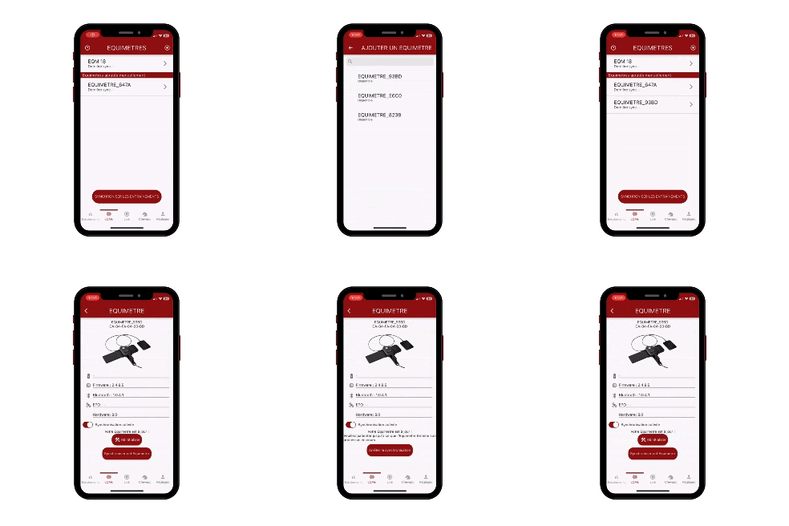
**2. Add a new EQUIMETRE:**
- To add a new EQUIMETRE, click on «add a EQUIMETRE» or click on the + sign at the top right of the "EQMs" page.
- The list of EQUIMETREs detected within range is displayed.
- Select the EQUIMETRE sensor to add to your list: the EQUIMETRE ID is located on the back of the case.
- 
Once the operation is done, click on «Synchronization of training» in the home page "Trainings".
The percentage change indicates the progress of the download.
**Change the settings of the application:**
The ability to change the language, live settings, access the knowledge base or billing information.
You can also find more information in the following articles:
[How to synchronise my data?](https://knowledgebase.equimetre.com/en/how-to-synchronise-my-data?hsLang=en)
[How to add a horse to my list?](https://knowledgebase.equimetre.com/en/how-to-add-a-horse-to-my-list?hsLang=en)
- [USE OF THE SENSOR](https://knowledgebase.equimetre.com/en/use-of-the-sensor?hsLang=en)
- [THE EQUIMETRE APP](https://knowledgebase.equimetre.com/en/the-equimetre-app?hsLang=en)
- [FIRST STEPS WITH EQUIMETRE](https://knowledgebase.equimetre.com/en/first-steps-with-equimetre?hsLang=en)
- [THE EQUIMETRE PLATFORM](https://knowledgebase.equimetre.com/en/the-equimetre-platform?hsLang=en)
- [FIRST STEPS IN THE ANALYSIS](https://knowledgebase.equimetre.com/en/first-steps-in-the-analysis?hsLang=en)
- [GOING FURTHER IN THE ANALYSIS](https://knowledgebase.equimetre.com/en/going-further-in-the-analysis?hsLang=en#main-content)
- [Dashboard Vet - ECG analysis platform](https://knowledgebase.equimetre.com/en/going-further-in-the-analysis?hsLang=en#dashboard-vet-ecg-analysis-platform)
- [TECHNICAL SUPPORT](https://knowledgebase.equimetre.com/en/technical-support?hsLang=en)
[](http://horselab.com)
KNOWLEDGE BASE EQUIMETRE
Copyright © 2026, ARIONEO